
Last updated Jan 20, 2026.
Why Tencent Hunyuan OCR with Qubrid API Sets a New Industry Standard for Document Intelligence
8 minutes read

Qubrid Team

For years, OCR has been treated as a solved problem. Extract text from an image, dump it into a file, and move on. But anyone who has actually built production systems knows the truth - real-world documents are messy. They are skewed, low resolution, multilingual, handwritten, stamped, folded, and photographed in poor lighting. Traditional OCR systems break the moment reality deviates from perfect scans.
At Qubrid, we believe OCR should not just read documents. It should understand them. That's why we've integrated Tencent Hunyuan OCR, one of the most advanced document intelligence models available today.
You can access it here:
👉 https://qubrid.com/models/tencent-hunyuan-ocr
Benchmark Results That Actually Matter
Instead of marketing claims, let's talk numbers.
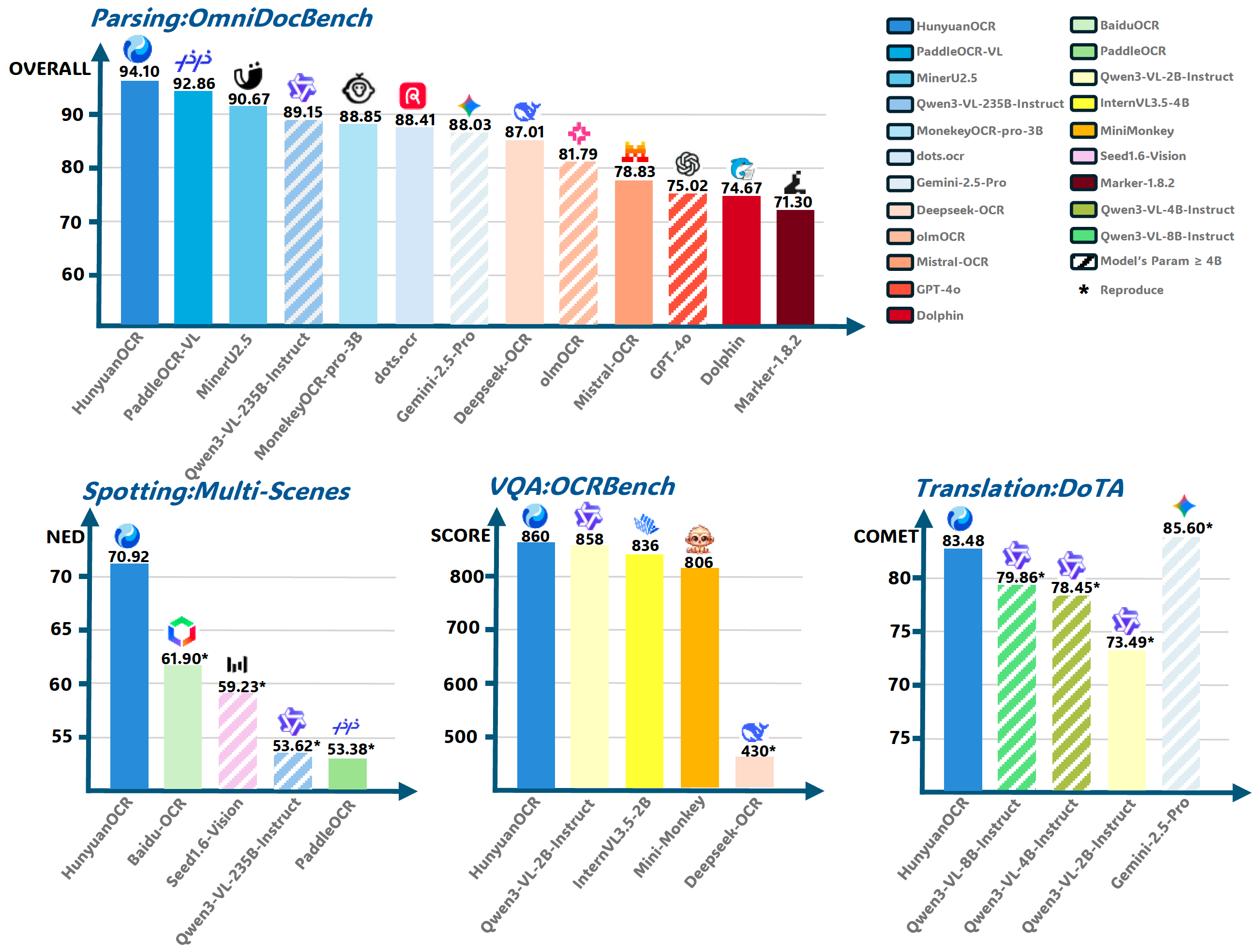
On OmniDocBench, one of the most comprehensive document parsing benchmarks, Tencent Hunyuan OCR achieves an overall score of 94.10. This places it at the very top, outperforming models like PaddleOCR-VL, Qwen3-VL, Gemini-2.5-Pro, DeepSeek OCR, GPT-4o and several others.
What makes OmniDocBench important is its realism. It doesn't test on clean textbook images. It evaluates real enterprise documents - forms, invoices, multi-column layouts, tables, stamps and low-quality scans. Scoring above 94 in this benchmark means Hunyuan isn't just good in labs, it works in production.
In multi-scene spotting benchmarks, which evaluate performance on complex real-world images like receipts, signboards, warehouse labels and ID cards, Hunyuan again leads. It records the lowest normalized edit distance, meaning fewer character errors even when images are blurred, angled or poorly lit. This is crucial for industries like logistics, retail and field operations where perfect images are a luxury.
The story gets more interesting on OCRBench, a benchmark that tests whether a model can reason over extracted text. Hunyuan scores 860, outperforming Qwen3-VL, InternVL and Mini-Monkey. This shows that the model doesn't just extract text - it understands it well enough to answer questions, validate information and support AI agents. This is where OCR becomes true document intelligence.
Even in document translation tasks measured by the DoTA benchmark, Hunyuan performs strongly with a COMET score of 83.48. This means it can extract text, translate it and preserve structure in one pipeline. For global companies dealing with cross-border documents, this eliminates the need for separate OCR and translation engines.
Why Tencent Hunyuan OCR Is Technically Superior
Most traditional OCR systems rely on convolutional networks and rule-based post-processing. They read characters locally and try to stitch everything together later. Hunyuan takes a fundamentally different approach.
At its core, the model uses Vision Transformers. Instead of scanning small patches of an image, transformers look at the entire page at once. This allows Hunyuan to understand global context. It knows where a header ends, where a table begins, and how different text blocks relate to each other.
This architectural shift is why Hunyuan handles multi-column documents, rotated text and irregular layouts far better than legacy engines. It doesn't just see pixels - it sees structure.
The model also includes advanced layout reasoning. Using region proposal networks combined with graph-based spatial modeling, each detected text block becomes a node in a spatial graph. This allows the model to infer relationships between sections, fields and tables. That's why invoices come out structured, contracts retain clause boundaries and forms preserve key-value mappings.
Table recognition is another area where Hunyuan clearly separates itself. Traditional OCR systems flatten tables into plain text, destroying row and column relationships. Developers then spend weeks rebuilding the structure with custom logic. Hunyuan directly detects cell boundaries and alignment. The output is already structured, often in clean JSON. What used to take weeks of engineering effort is now handled natively by the model.
Handwriting recognition is notoriously difficult, yet Hunyuan performs remarkably well here too. The model was trained on massive handwriting datasets covering forms, notes and signatures. Using sequence-to-sequence decoding with attention mechanisms and an internal language model, it corrects common writing errors automatically. The result is accuracy that traditional OCR engines simply cannot match.
Multilingual support is equally strong. Hunyuan can detect and process multiple languages within the same document without manual configuration. Whether it's English, Chinese, Hindi, Arabic or mixed scripts, the model adapts dynamically. This is critical for multinational enterprises dealing with cross-border documentation.
Real Implementation Details
Tencent has openly shared implementation details on HuggingFace, which speaks to the maturity of this model.
The architecture follows a multi-stage pipeline. First, a Vision Transformer-based encoder extracts multi-scale visual features from the document. Next, a layout detection module identifies text regions, tables and structural blocks. A transformer decoder then performs sequence-level text recognition with character-level attention. Finally, a post-processing engine reconstructs reading order, table structures and semantic groupings.
From a developer standpoint, this means you don't just get raw text. You receive bounding boxes, confidence scores, structured JSON outputs and table mappings. This dramatically simplifies downstream processing.
The model supports standard formats like JPG, PNG and PDF, and works equally well with scanned documents and mobile phone images.
Why Run Hunyuan OCR on Qubrid
A great model is useless if it's hard to deploy. That's where Qubrid comes in.
We provide instant access to Hunyuan OCR through a production-ready platform with high-performance GPU infrastructure. You don't need to worry about provisioning servers, managing memory, or optimizing inference. Everything is handled for you.
What sets Qubrid apart is control and transparency. You get clean APIs, predictable pricing and the freedom to scale up or down as needed. You're not locked into a black-box SaaS product. You're building on real AI infrastructure.
For startups, this means faster MVPs. For enterprises, it means stable, compliant deployments with enterprise-grade reliability.
Real-World Applications
Teams are already using Hunyuan OCR on Qubrid for KYC automation, invoice processing, contract digitization, logistics documentation and medical record extraction. In each case, the impact is immediate - fewer manual reviews, faster processing times and significantly lower operational costs.
This is what happens when OCR actually understands documents.
How to Use Tencent Hunyuan OCR on Qubrid (API Example)
Getting started with Hunyuan OCR on Qubrid is straightforward. Below is a simple cURL example showing how to send an image and receive OCR results.
Single Image OCR Request
curl -X POST "https://platform.qubrid.com/api/v1/qubridai/chat/completions" \
  -H "Authorization: Bearer " \
  -H "Content-Type: application/json" \
  -d '{
  "model": "tencent/HunyuanOCR",
  "messages": [
    {
      "role": "user",
      "content": [
        {
          "type": "image_url",
          "image_url": {
            "url": "https://cdn.britannica.com/61/93061-050-99147DCE/Statue-of-Liberty-Island-New-York-Bay.jpg"
          }
        }
      ]
    }
  ],
  "max_tokens": 4096,
  "temperature": 0,
  "stream": false,
  "language": "auto",
  "ocr_mode": "general"
}'
In this request, you simply pass the image URL inside the messages array. The model automatically detects text, layout, and structure. Setting temperature to 0 ensures deterministic and highly accurate outputs, which is ideal for OCR workloads.
Processing Multiple Images in One Request
If you want to analyze multiple images in a single API call (for example, multi-page documents or batch uploads), you just need to add more image_url blocks inside the same message.
curl -X POST "https://platform.qubrid.com/api/v1/qubridai/chat/completions" \
  -H "Authorization: Bearer " \
  -H "Content-Type: application/json" \
  -d '{
  "model": "tencent/HunyuanOCR",
  "messages": [
    {
      "role": "user",
      "content": [
        {
          "type": "image_url",
          "image_url": {
            "url": "https://cdn.britannica.com/61/93061-050-99147DCE/Statue-of-Liberty-Island-New-York-Bay.jpg"
          }
        },
        {
          "type": "image_url",
          "image_url": {
            "url": "https://cdn.britannica.com/61/93061-050-99147DCE/Statue-of-Liberty-Island-New-York-Bay.jpg"
          }
        },
        {
          "type": "image_url",
          "image_url": {
            "url": "https://cdn.britannica.com/61/93061-050-99147DCE/Statue-of-Liberty-Island-New-York-Bay.jpg"
          }
        }
      ]
    }
  ],
  "max_tokens": 4096,
  "temperature": 0,
  "stream": true,
  "language": "en",
  "ocr_mode": "general"
}'
For every new image, simply append this block:
{
  "type": "image_url",
  "image_url": {
    "url": "IMAGE_URL_HERE"
  }
}
Hunyuan OCR will process all images together and return a combined structured response, making it perfect for batch processing, multi-page documents, or workflows like invoice stacks and ID verification.
Working with PDFs
If you need to analyze a PDF, the recommended approach is:
Convert each page of the PDF into an image (PNG or JPG).
Pass each page as a base64 image (recommended) with a separate
image_urlblock in the same request.
Example flow:
PDF → Page 1 → Image
PDF → Page 2 → Image
PDF → Page 3 → Image
Then send all page images together using the multi-image format shown above.
Hunyuan OCR will:
Read each page
Understand layout
Preserve structure
Return a single combined result across all pages
This ensures consistent extraction for long contracts, reports, bank statements, or multi-page forms.
Why This API Design Matters
This flexible image-based input design allows you to:
Process entire documents in one call
Build batch OCR pipelines
Handle scanned PDFs
Run streaming responses for large files
Keep your system stateless and scalable
Our Thoughts
OCR is no longer about reading text. It's about understanding documents.
Tencent Hunyuan OCR represents the next generation of document intelligence, and Qubrid makes it accessible, scalable and production-ready.
If your business deals with documents - and every business does - this is the upgrade you've been waiting for.
👉 Try it here: https://qubrid.com/models/tencent-hunyuan-ocr
Related posts
View all posts
How to Run Kimi K3 on Hermes Agent
Run Moonshot AI's Kimi K3 inside Hermes Agent using Qubrid's OpenAI-compatible API. Full setup, code examples, pricing ($3/M input), and vision support. Live in 10 minutes
 Qubrid Team
Qubrid AI Is Now Live on the Dify Marketplace
Qubrid AI is now officially listed on the Dify Marketplace, giving Dify's developer community direct, OpenAI-compatible access to Qubrid's model catalog inside any chat app, agent, or workflow. No custom integration, no separate infrastructure to stand up. Install the plugin, connect an API key, and Qubrid's models are available wherever Dify builds.
Qubrid Team
How to Use Open Source AI Models Directly in VS Code (Without Switching Tools)
Stop context-switching between your editor and AI chat tools. Here's how to run open source models like GLM-5.2, DeepSeek, and Llama 4 natively inside VS Code using Qubrid's inference API
Qubrid Team