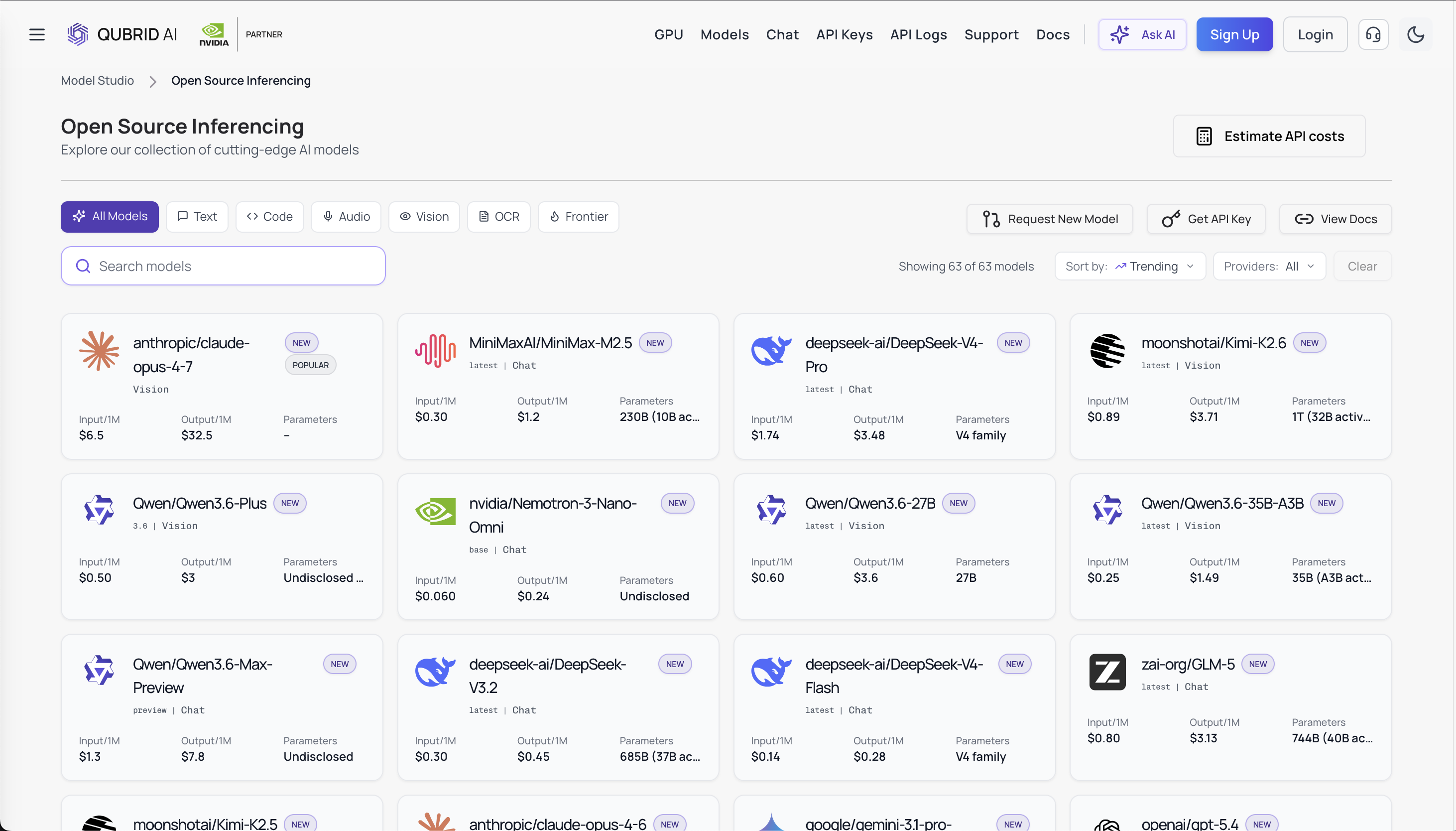
Kimi K2.6 API on Qubrid AI - Setup, Performance, Pricing, and What You Need to Know Before Going to Production
If you've been following the open-source LLM space over the past few months, you already know that Moonshot AI has been one of the more interesting players to watch. Their latest release, Kimi K2.6, is generating real attention among developers, and not just because of the benchmark numbers.
Try the Kimi K2.6 model here: https://www.qubrid.com/models/kimi-k2.6
Kimi K2.6 isn't simply a model update. It represents a meaningful shift in what open-weight models are now capable of, particularly in long-horizon coding, complex reasoning, and multi-agent orchestration. For developers who've been frustrated by the cost ceiling of proprietary frontier models, K2.6 opens up a genuinely different path. One that doesn't require you to compromise on capability. But accessing the model is one thing. Using it efficiently in production is something else entirely.
So You Heard About Kimi K2.6 - Here's What's Actually Going On
The interest around Kimi K2.6 has grown fast, and it's not just hype. Developers building AI-heavy applications, copilots, automation pipelines, and backend intelligence layers are looking at it seriously because it hits a combination that's genuinely hard to find: strong reasoning, long context, multimodal input, and open-weight flexibility.
Built on a sparse Mixture-of-Experts architecture with 1 trillion total parameters and 32 billion active per token, K2.6 is designed to punch well above its compute weight. With a 256K token context window, native support for text, image, and video, and the ability to coordinate up to 300 parallel sub-agents it's built for the kind of work most lightweight models simply can't sustain.
It also ships with two modes: instant mode for fast, direct responses, and thinking mode for full chain-of-thought reasoning. That flexibility is real and useful. You're not choosing between a fast model and a smart one. You're choosing per task.
Is Kimi K2.6 Actually Good, or Just Benchmark-Good?

On SWE-Bench Verified, LiveCodeBench, and Aider Polyglot, K2.6 delivers results competitive with leading frontier models for tasks that require sustained multi-step reasoning, not pattern matching. In agent and tool-use evaluations it consistently outperforms models of comparable active parameter size.
But benchmarks only tell part of the story. What actually matters in production is whether the model holds up across varied, real-world workloads not just curated test sets. For use cases like long-context document analysis, multi-step code generation, and agentic workflows where a model needs to plan and execute across many steps, K2.6 genuinely delivers. It's not benchmark-good. It's the real thing.
How Fast Is It in Production?
In instant mode, throughput is competitive for interactive workloads. In thinking mode, it trades speed for depth response times increase, but the reasoning quality on complex tasks improves substantially. For real-time user-facing features, instant mode is your default. For backend pipelines where a better answer is worth a longer wait, thinking mode earns its overhead.
This distinction matters a lot depending on what you're building. The good news is you don't have to choose once and live with it you pick the mode per request, per task type, per workload. That's a level of control most model APIs don't give you at this level of capability.
What Does It Actually Cost Per Request?
On Qubrid AI: $0.89 per million input tokens, $0.18 per million cached input tokens, $3.71 per million output tokens. Competitive against frontier proprietary models, and the MoE architecture keeps compute efficient relative to what you're getting.
For context, most frontier proprietary models charge significantly more for comparable reasoning capability. What K2.6 offers is a meaningful step down in cost without a meaningful step down in output quality, at least for the workloads it's designed for. The cached input rate at $0.18 per million is particularly useful for applications that repeatedly pass the same system prompt or context, which covers most production patterns.
Will Thinking Mode Blow Up My Token Budget?
It can, if you're not deliberate about when you enable it. Thinking mode is verbose by design, the model reasons explicitly, which means longer completions and higher token counts. For complex reasoning tasks, that verbosity produces measurably better results. For simple, high-volume requests, it's unnecessary overhead. The fix is straightforward: use instant mode as your default and enable thinking only where the task warrants it.
This is where many teams run into unexpected cost scaling in production. What looks affordable during testing where every request feels complex enough to justify thinking mode, can grow quickly when that same setting is left on across thousands of routine requests. The model isn't misbehaving. It's doing exactly what it's designed to do. The discipline is on the integration side: route thoughtfully, not uniformly.
Why try Kimi K2.6 on Qubrid AI
This is the question worth spending a moment on, because the answer is more practical than it might seem.
You could technically look for direct or self-hosted access to Kimi K2.6. But here's what that actually means in practice: you're managing your own infrastructure, dealing with provider-specific quirks, handling reliability and uptime yourself, and most importantly, losing the ability to easily switch or route across models as your requirements evolve.
Qubrid AI solves all of that in one move.
Try the Kimi K2.6 model here: https://www.qubrid.com/models/kimi-k2.6
The API is OpenAI-compatible, which means zero SDK migration. The infrastructure runs on NVIDIA GPUs and is managed entirely on the platform side, with no DevOps overhead on your end. And because Qubrid gives you access to multiple models through the same endpoint, you're not locked into K2.6 forever. If a task is better served by a different model, you route to it. Same API, no rewrite.
There's also the pricing structure: serverless pay-as-you-go with no idle costs, plus dedicated GPU VM deployments starting at $1.25/GPU/hr for teams that need consistent throughput. Most providers force you to choose one model and one billing structure. Qubrid doesn't.
And practically speaking Qubrid is already running this. The model is live, the endpoint is stable, and you can go from API key to first response in under ten minutes.
What Makes Qubrid Different From Every Other API Platform
Most inference platforms are essentially wrappers. You get an endpoint, a rate limit, and a pricing page. What you don't get is flexibility at the system level.
Qubrid is built differently, and it matters once you move past experimentation.
Multi-model by design. Instead of coupling your application to a single model, you access everything through a unified API. Kimi K2.6 for deep reasoning. A faster model for lightweight requests. Dynamic routing based on cost, latency, or task type without touching your integration layer. That's not a feature most platforms offer. It's the entire point of Qubrid.
Three ways to deploy, not one. The Playground lets you test prompts and compare instant vs. thinking mode responses before writing a single line of integration code. The API gives you serverless access with pay-as-you-go billing. Dedicated GPU VMs give you isolated, consistent inference for production workloads that need it. Most platforms give you one of these. Qubrid gives you all three, and they connect into a natural workflow: test → integrate → scale.
OpenAI-compatible everywhere. This sounds obvious, but it isn't. Full compatibility means your existing tooling, SDKs, and integrations work without modification. You're not relearning an API surface. You're not translating between formats. You plug in a new base URL and you're done.
No idle cost model. Serverless billing means you pay for what you use. That's the right model for teams whose AI workloads aren't perfectly uniform, which is most teams.
The difference between Qubrid and a basic inference wrapper is the same difference between a platform and a pipe. One lets you build something durable. The other just passes traffic.
How to Get Started in Under Ten Minutes
Step 1 - Create your account: Sign up at qubrid.com. No credit card required at registration.
Step 2 - Add credits: Deposit a minimum of $5 to unlock API access. Qubrid credits $1 in free tokens on your first deposit.
Step 3 - Generate your API key: Go to platform.qubrid.com/api-keys → Create New Key → copy and store it securely. Never put it in client-side code. Store it as an environment variable and load it server-side only.
Step 4 - Make your first call
# pip install openai
from openai import OpenAI

client = OpenAI(
    base_url="https://platform.qubrid.com/v1",
    api_key="YOUR_QUBRID_API_KEY",
)

stream = client.chat.completions.create(
    model="moonshotai/Kimi-K2.6",
    messages=[
        {"role": "user", "content": "Explain MoE architecture in simple terms."}
    ],
    max_tokens=1024,
    temperature=0.6,
    top_p=0.95,
    stream=True,
)

for chunk in stream:
    if chunk.choices and chunk.choices[0].delta.content:
        print(chunk.choices[0].delta.content, end="", flush=True)
If you see streaming output in your terminal, you're live. The base URL swap from api.openai.com to platform.qubrid.com/v1 is genuinely the only change needed in an existing OpenAI integration.
Optional - Test in the Playground first: Before any code, try K2.6 interactively at platform.qubrid.com/playground. Adjust temperature, switch between instant and thinking mode, and calibrate your prompts before touching your integration. For a model where mode selection meaningfully affects both output quality and cost, starting here saves time and avoids surprises.
Final Thoughts
Kimi K2.6 is one of the most capable open-weight models available right now. Strong reasoning, long context, multimodal input, agent-ready architecture, it checks boxes that most models in its class don't.
But like any powerful model, it rewards thoughtful usage. Thinking mode is verbose. Costs scale with how you use it, not just the base rate. Latency varies depending on the mode. These aren't dealbreakers; they're just things worth knowing before you go to production.
Try the Kimi K2.6 model here: https://www.qubrid.com/models/kimi-k2.6
Accessing K2.6 through Qubrid AI gives you the flexibility to use it well: selectively for tasks where its depth is justified, routed to faster alternatives when it isn't, and managed through a single unified API that doesn't grow more complex as your requirements do.
That's what separates a working demo from a production-ready AI system, and it's exactly what Qubrid is built to enable.