DeepSeek V4 Pro API - See How Easy It Is on Qubrid AI
If you’ve been working with large language models over the past year, you’ve probably felt the shift already. Developers are no longer relying on a single provider like before. Instead, the focus has moved toward flexibility, cost control, and performance tuning - and that’s exactly where the DeepSeek V4 Pro API starts to stand out.
https://www.qubrid.com/models/deepseek-v4-pro
DeepSeek V4 Pro isn’t just another model release. It represents a broader change in how teams are thinking about AI infrastructure. Rather than chasing the most hyped model, developers are increasingly choosing models that deliver strong reasoning, solid coding ability, and - most importantly - predictable and affordable inference at scale. That combination is what’s driving the growing interest around DeepSeek V4 Pro.
But accessing a model is one thing. Actually using it efficiently in production is something else entirely.
Why the DeepSeek V4 Pro API Is Gaining Traction
The demand for the DeepSeek V4 Pro API has been rising quickly, especially among teams that are building AI-heavy applications and can’t afford unpredictable costs. Compared to traditional LLM APIs, DeepSeek offers a much more balanced trade-off between performance and pricing - at least at first glance.
For use cases like code generation, structured outputs, and long-context reasoning, DeepSeek V4 Pro performs surprisingly well. It’s particularly effective in backend-heavy applications where consistency matters more than flashy creativity. That makes it a strong candidate for copilots, internal tools, and automation workflows.
At the same time, developers searching for terms like “cheapest LLM API,” “DeepSeek API integration,” or “OpenAI alternative API” are often not just experimenting - they’re actively trying to reduce their inference bills while maintaining output quality. DeepSeek V4 Pro fits directly into that intent.
Still, there’s a catch that becomes obvious the moment you move beyond simple testing.
Benchmark Performance: Where DeepSeek V4 Pro Stands Today

On the Artificial Analysis Intelligence Index, DeepSeek V4 Pro (Reasoning, Max Effort) scores 52, placing it well above the average score of 29 across comparable models. From a pure reasoning standpoint, this confirms that the model is operating in the upper tier of available LLMs.
But benchmarks only tell part of the story.
During evaluation, DeepSeek V4 Pro generated 190 million tokens, compared to an average of just 42 million across other models. That level of verbosity is important - it signals that while the model is highly capable, it also tends to produce significantly longer outputs, which directly impacts both latency and cost per request.
This is one of the subtle but critical details that many developers miss when evaluating models purely on benchmark scores.
Speed and Latency: The Trade-Off Behind Intelligence

Speed is where the trade-offs become more visible.
DeepSeek V4 Pro operates at around 34 tokens per second, which is notably slower than the average of 57 tokens per second across similar models. In isolation, this might not seem critical - but in production environments, especially those involving real-time user interactions, latency compounds quickly.
If you’re building chat applications, copilots, or interactive AI systems, slower response times can directly impact user experience. This is why searches like “fastest LLM API” and “low latency AI inference” are becoming increasingly common.
DeepSeek excels in reasoning - but not necessarily in responsiveness.
Pricing and Cost Efficiency: Where DeepSeek V4 Pro Gets Misunderstood

At first glance, the DeepSeek V4 Pro API looks like a cost-effective alternative - especially if you’re comparing it to premium models like GPT or Claude. On a per-token basis, it is indeed cheaper than most frontier models, which is why it often shows up in searches like “cheapest LLM API” or “OpenAI alternative pricing.”
But that’s only half the story.
When you compare DeepSeek V4 Pro to the broader market - including open-weight and efficiency-focused models - the pricing starts to feel less competitive. At around $1.74 per million input tokens and $3.48 per million output tokens, it sits noticeably above the industry average, which is closer to $0.50 and $1.69 respectively.
The more important factor, though, isn’t just the price per token - it’s how many tokens you actually end up using.
DeepSeek V4 Pro is known to be highly verbose. In benchmark evaluations, it generated 190 million tokens, compared to an average of just 42 million across other models. That means even if the per-token price seems reasonable, the cost per task can increase significantly because the model simply produces more output.
This is where many teams run into unexpected scaling issues. What looks affordable in testing can quickly become expensive in production, especially for high-volume applications.
A more accurate way to think about it is this: DeepSeek V4 Pro is cheap relative to top-tier models, but can be expensive relative to efficient alternatives - particularly when verbosity and latency are factored in.
That’s also why developers are increasingly exploring approaches like multi-model routing or unified AI APIs, where DeepSeek is used selectively - only for tasks where its higher reasoning capability actually justifies the additional cost.
In practice, the goal isn’t to avoid DeepSeek V4 Pro - it’s to use it intelligently.
Benchmark Cost Analysis: Why DeepSeek V4 Pro Gets Expensive in Practice

Looking at per-token pricing alone doesn’t fully capture how expensive a model is in real-world usage. A more accurate way to evaluate cost is by looking at benchmark execution cost and token consumption, which is where DeepSeek V4 Pro starts to stand out for a different reason.
In the Artificial Analysis Intelligence benchmark, DeepSeek V4 Pro required significantly higher token usage than most comparable models. Its combined reasoning and output tokens were among the highest in the group, reinforcing the observation that the model is highly verbose by design.
This directly translates into higher evaluation and runtime costs.
In fact, running the Intelligence Index benchmark on DeepSeek V4 Pro costs over 15× more than DeepSeek V3.2, and even exceeds the cost of models like Gemini 3.1 Pro in certain scenarios. That gap isn’t just due to pricing - it’s largely driven by how many tokens the model generates per task.
This is an important distinction. Two models might appear similarly priced per token, but if one consistently produces 3–5× more tokens per request, the effective cost per query increases dramatically.
For developers building production systems, this has real implications:
Higher cost per user interaction
Increased latency due to longer outputs
Reduced efficiency in high-volume workloads
This is also why many teams evaluating “DeepSeek V4 Pro cost vs alternatives” quickly move beyond pricing tables and start looking at cost-per-task and token efficiency instead of just cost-per-token.
The takeaway here isn’t that DeepSeek V4 Pro is overpriced - it’s that it behaves differently from more optimized models.
It prioritizes:
deeper reasoning
more detailed outputs
higher token generation
Which means: You’re not just paying for intelligence - you’re paying for how much the model thinks out loud. For certain use cases, that’s exactly what you want. But for others, it can introduce unnecessary overhead.
This is where the earlier point about not relying on a single model becomes even more relevant.
Instead of using DeepSeek V4 Pro for every request, many teams are now:
Using it selectively for complex reasoning
Switching to faster, cheaper models for simpler tasks
Routing dynamically based on cost and latency
And that’s precisely the kind of flexibility platforms like Qubrid AI are designed to enable - without forcing you to compromise on performance where it actually matters.
The Hidden Complexity of Using DeepSeek Directly
On paper, integrating the DeepSeek V4 Pro API looks straightforward. You get access, plug it into your application, and start generating outputs. But as usage grows, limitations begin to surface.
Relying on a single model creates friction in places you don’t initially expect. You might run into performance inconsistencies across tasks, or realize that certain workflows would benefit from a different model entirely. There’s also the issue of cost optimization - what works for one request type may not be efficient for another.
This is why many developers searching for “multi-model AI API” or “unified LLM API” are already thinking one step ahead. They’re not just asking how to use DeepSeek - they’re asking how to use it alongside other models without increasing complexity.
And that’s where things start to get interesting.
Using DeepSeek V4 Pro API Through Qubrid AI
Instead of treating DeepSeek V4 Pro as a standalone dependency, a more scalable approach is to access it through a unified platform like Qubrid AI. This changes the role of the API entirely.
With Qubrid AI, the DeepSeek V4 Pro API becomes part of a broader multi-model system, rather than a single point of reliance. You can call DeepSeek when you need cost-efficient reasoning, switch to another model for different workloads, and do it all without rewriting your integration.
This is particularly useful for teams building production-grade systems where requirements evolve quickly. Rather than committing to one provider, you gain the ability to adapt in real time - whether that means optimizing for cost, latency, or output quality.
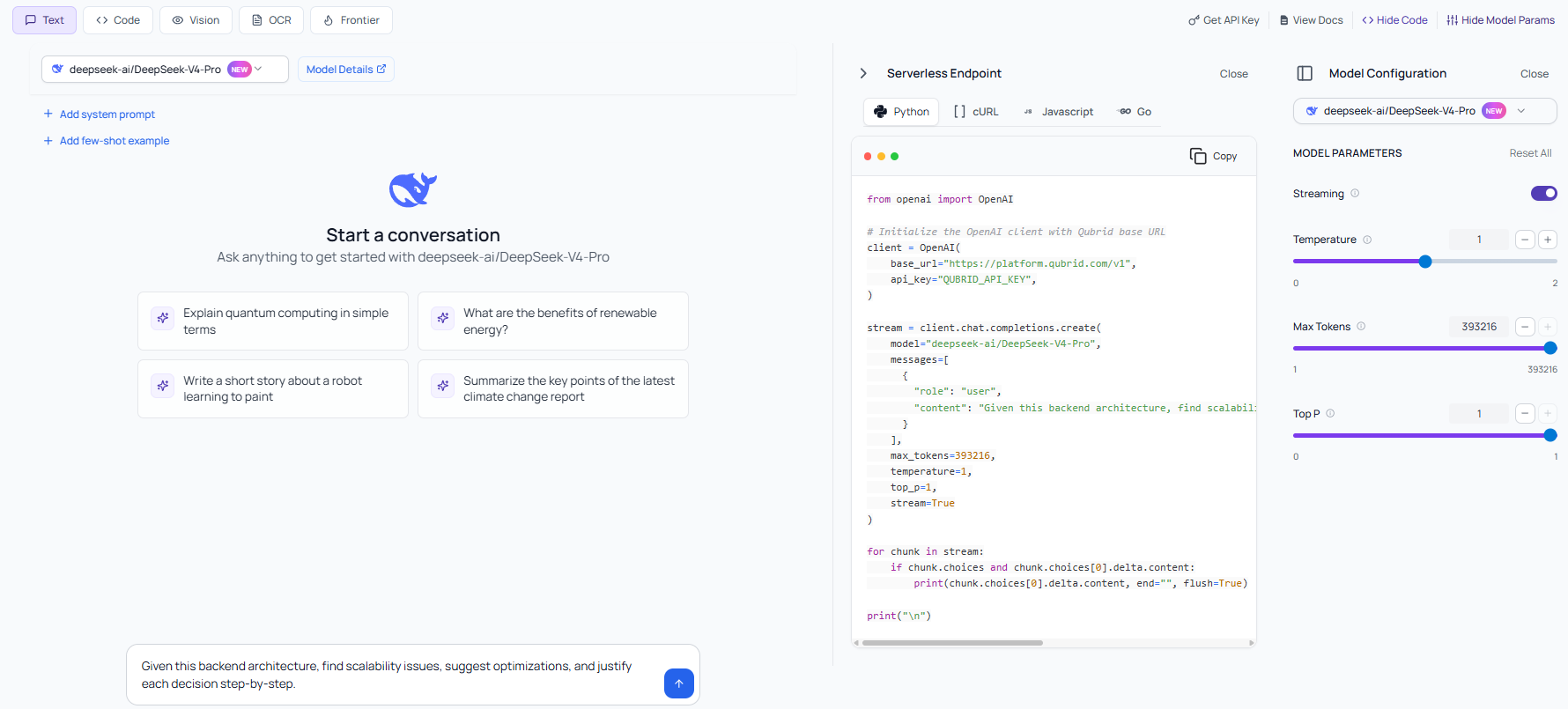
One of the biggest advantages of using the DeepSeek V4 Pro API through Qubrid AI is how simple the integration process actually is. Instead of dealing with fragmented endpoints or provider-specific quirks, Qubrid offers OpenAI-compatible APIs, which means you can plug it into your existing workflows with minimal changes.
Whether you're building in Python, JavaScript, Go, or even using cURL, the experience remains consistent. This is particularly useful for teams that want to experiment quickly or migrate from existing providers without rewriting large parts of their codebase.
In practice, this means if you’ve already worked with OpenAI-style APIs, you can start using DeepSeek V4 Pro on Qubrid almost immediately - no steep learning curve, no custom SDK headaches.
When DeepSeek V4 Pro Actually Makes Sense
DeepSeek V4 Pro is not a one-size-fits-all model - but in the right scenarios, it’s extremely effective.
It works best for:
Complex reasoning workflows
Long-context document analysis (up to 1M tokens)
Backend automation where latency is less critical
High-accuracy coding and structured outputs
In these situations, the higher cost is often justified by the quality of results.
A More Practical Way to Think About LLM APIs
One of the biggest misconceptions developers have is treating model selection as a one-time decision. In reality, the most efficient AI systems today are built on dynamic model usage.
For example, you might use DeepSeek V4 Pro for structured reasoning tasks where cost efficiency is critical, while relying on another model for faster or more lightweight responses. Trying to manage this manually across multiple APIs quickly becomes messy, which is exactly why unified inference platforms are gaining adoption.
The DeepSeek V4 Pro API, when used in isolation, is powerful. But when used within a system that allows routing, fallback handling, and multi-model orchestration, it becomes significantly more valuable.
Three Simple Ways to Get Started on Qubrid AI
What makes Qubrid stand out is that it doesn’t lock you into a single way of working. Depending on your use case, you can choose how you want to access and deploy DeepSeek V4 Pro.
API Access (Fastest Way to Integrate)
The most straightforward approach is through APIs. You can generate an API key and start making requests instantly using OpenAI-compatible endpoints. This is ideal for developers building applications, backend services, or AI-powered features that need to scale.Dedicated GPU Deployment (More Control & Performance)
For teams that need more control over performance or want isolated environments, Qubrid allows you to deploy models on dedicated GPU VMs. Pricing starts at around $1.25 per deployment, making it a practical option for production workloads that require consistency and reliability.Playground (Best for Testing & Iteration)
If you’re still experimenting, the Qubrid Playground provides an easy way to test prompts, evaluate responses, and fine-tune workflows before integrating into your application. This is especially useful when working with a model like DeepSeek V4 Pro, where prompt structure can significantly impact output length and cost.
This flexibility is more important than it seems. Most platforms force you into a single interaction model - either APIs or hosted deployments. Qubrid, on the other hand, gives you a full workflow:
Test in Playground
Integrate via API
Scale via dedicated infrastructure
And because everything runs through OpenAI-compatible endpoints, switching between models - or even between providers - doesn’t require reworking your stack.
Final Thoughts
DeepSeek V4 Pro is quickly becoming one of the most practical choices for developers who care about efficiency and performance. Its API is powerful, accessible, and well-suited for a wide range of real-world applications.
But it’s also important to acknowledge the trade-offs:
High intelligence (score: 52)
High verbosity (190M tokens generated)
Higher cost than average
Slower response speeds
These factors don’t make it a bad model - they simply mean it needs to be used strategically.
Using the DeepSeek V4 Pro API through Qubrid AI allows you to keep its strengths while avoiding its downsides. You get the flexibility to optimize every request, balance cost and performance, and build systems that scale intelligently.
And in a space where both expectations and costs are rising rapidly, that flexibility is what ultimately separates experimentation from production-ready AI.